Physical Address
304 North Cardinal St.
Dorchester Center, MA 02124
Physical Address
304 North Cardinal St.
Dorchester Center, MA 02124

After years of helping family historians transform their research chaos into organized systems, I have learned one fundamental truth: genealogy organization is not a sprint but a structured journey. Whether you inherited boxes of unsorted photos from a relative or your digital files have multiplied into an unmanageable maze, creating order from this wealth of material requires methodical thinking rather than frantic sorting. In this guide, you will discover practical strategies for how to organize your genealogy research effectively, building systems that grow with your discoveries rather than collapse under them.
The challenge most researchers face is not a lack of dedication but the absence of a coherent framework. You may spend hours searching for that one census record you know you downloaded, or feel guilty about the shoebox of photographs waiting for labels. What you need is a sustainable approach that addresses both physical papers and digital assets while respecting the time constraints of modern life. The methods outlined here blend proven archival techniques with contemporary digital workflows.
Before diving into specific systems, consider what successful organization actually means for your research. It is not about achieving perfection or cataloging every item within twenty-four hours. Instead, it means establishing reliable pathways to locate any document within minutes, protecting irreplaceable materials from deterioration, and creating clear documentation that future generations can understand and build upon. By the end of this guide, you will have actionable steps to transform your genealogical collection into a well-ordered resource that supports rather than hinders your research.
Walking into a room filled with inherited papers or opening a hard drive containing thousands of unsorted files can trigger genuine overwhelm. The emotional weight of family history combines with the practical challenge of sheer volume. Rather than attempting to conquer everything simultaneously, successful organization begins with thoughtful assessment and strategic planning.
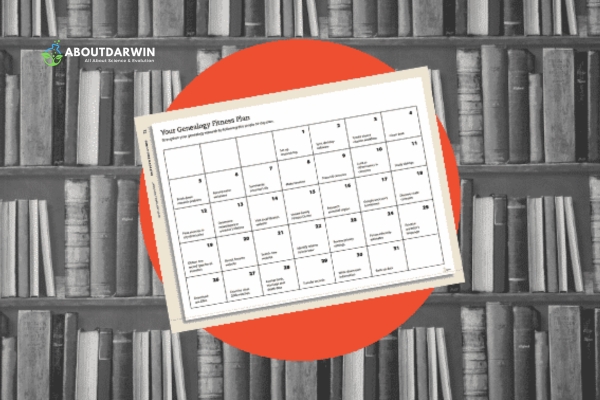
Think of this phase as creating a research plan for your own collection. Just as you would not begin investigating an ancestor without knowing what questions to ask, you should not start sorting without understanding what you possess and what you hope to achieve. This preliminary work prevents the common trap of organizing materials only to reorganize them later when a better system occurs to you.
The first step involves conducting a thorough inventory of your genealogical holdings. Set aside dedicated time to survey all physical materials including birth certificates, death records, marriage licenses, land deeds, military documentation, immigration papers, family bibles, newspaper clippings, correspondence, and photographs. For digital collections, create a similar inventory across all storage locations including your computer, external drives, cloud services, and any genealogy websites where you have saved records.
During this assessment, identify what you have in abundance and what appears to be missing. Do you possess twenty years of census records but few source citations? Are your photographs plentiful but completely unlabeled? Recognizing these patterns early helps you prioritize which organizational systems will yield the greatest immediate benefit. It also reveals duplicates that waste storage space and create confusion when you cannot remember which version is most current.
Pay special attention to fragile or deteriorating materials during your inventory. Old newspapers, acidic paper, and faded photographs require immediate intervention to prevent permanent loss. These items should receive priority treatment in your organization schedule, either through proper archival storage or digitization.
One of the most common mistakes in genealogy organization is treating it as a single weekend project rather than an ongoing practice. While concentrated effort can produce remarkable progress, thinking you will completely organize years of accumulated research in one day typically leads to frustration and abandoned systems. Instead, adopt the principle that professional archivists follow: organize as you go, building structure incrementally while continuing your research.
Apply the SMART goals framework to your organization project. Specific objectives work better than vague intentions. Rather than telling yourself to get organized, commit to creating a consistent file naming convention for all digital documents or establishing a surname-based folder system for physical papers. Measurable targets allow you to track real progress, such as processing one family line per week or digitizing fifty photographs per month.
Ensure your goals remain achievable given your available time and energy. If you have thirty minutes each evening for genealogical work, design systems that accommodate that reality. Relevant objectives connect directly to your research priorities; if you are currently investigating your maternal grandmother’s lineage, focus organizational energy there rather than distant collateral lines. Finally, time-bound your goals with specific deadlines that create accountability without inducing panic.
Also Read: Sentiment Through Preserving and Organizing Family Photos
Before selecting specific supplies or software, you must choose an organizational philosophy that matches how your brain processes family relationships. Genealogists have developed several proven systems over decades of trial and error, each with distinct advantages depending on your research style and family structure. Understanding these methods allows you to select or combine approaches that serve your unique situation.
The four primary organization approaches used by successful family historians include alphabetical by surname, family unit filing, color-coded generational systems, and geographic location methods. Many researchers ultimately employ hybrid systems combining elements from multiple approaches. The key is selecting a consistent method you can maintain long-term rather than constantly switching between systems.
The most widely recommended approach among professional genealogists assigns one file folder per nuclear family unit. This system, often called the One Family = One File Folder method, keeps all documents related to a specific married couple and their children together in a single location. When you need information about your great-grandparents and their offspring, you know exactly where to look without searching through multiple individual folders.
To implement this system, create folders named using a consistent format that identifies the family unit clearly. A proven naming convention follows this pattern: Head of Household Surname, followed by given names, then lifespan dates. For example, FRAZIER William 1826-1881 represents the family unit headed by William Frazier during those years. When a woman marries into the family, create a cross-reference from her birth family folder pointing to her married family folder, maintaining the trail across surname changes.
Within each family folder, arrange documents chronologically whenever possible. This creates a natural timeline of the family’s history, showing birth records followed by marriage documents, property transactions, and eventually death records. Some researchers prefer organizing by document type first, then chronologically within each type. Either approach works provided you maintain consistency across all folders.
Visual learners often benefit enormously from color-coding their genealogy materials. This system assigns a specific color to each branch of your family, typically following the four grandparent lines as a starting point. You might use blue for your paternal grandfather’s line, green for your paternal grandmother, red for your maternal grandfather, and yellow for your maternal grandmother. This immediate visual identification speeds retrieval and prevents misfiling.
Apply color-coding consistently across both physical and digital systems. In your paper files, use colored file folders, colored labels on manila folders, or colored binder spines. For digital organization, apply color tags to folders if your operating system supports them, or prepend color names to folder titles when necessary. The visual consistency creates powerful cognitive associations that help you navigate complex family structures intuitively.
Extend your color system to pedigree charts and family group sheets. When you print these fundamental genealogy forms, use colored paper matching each line’s assigned color, or add color-coded headers. This simple enhancement makes your research logs and working documents instantly recognizable by family branch.
Some researchers prefer organizing strictly by surname, creating master folders for each family name regardless of which branch they belong to. This approach works particularly well when researching common surnames with many unrelated lines, or when your research focuses heavily on surname heritage studies such as one-name projects. However, this method can become unwieldy when families intermarry or when surnames change through marriage or immigration.
Geographic filing organizes materials by location rather than by family unit. If your research centers on ancestors from a specific region, county, or town, this method brings together all records from that locality. You might find it efficient when researching land records, local histories, or census enumerations that apply to multiple families in one area. Many professional genealogists use location-based systems for their reference materials while maintaining family-based systems for personal documents.
Physical document organization requires quality materials that protect rather than damage your irreplaceable records. Invest in archival-quality supplies designed specifically for document preservation. Standard office supplies often contain acids and adhesives that deteriorate paper and photographs over decades. True archival materials cost more initially but protect investments of far greater value.
Start with sturdy file folders, preferably acid-free manila folders or archival-quality colored folders for your color-coded system. Hanging file folders work well for active research files you access frequently, while standard folders stored in archival boxes protect long-term storage materials. Use page protectors made from polyester or polypropylene, never vinyl, to safeguard individual documents you handle regularly.
Three-ring binders provide excellent organization for actively researched family lines, allowing you to arrange documents in chronological sequence while keeping them protected in page protectors. However, binders should never be overfilled as this stresses the rings and damages contents. When a binder becomes too full, split it logically by generation or time period, maintaining clear labeling that shows the relationship between volumes.
Professional genealogists rely on document numbering systems to maintain precise tracking of every piece of evidence in their research. This practice creates an unbreakable chain connecting physical documents to database entries, research logs, and source citations. Without numbering, you eventually encounter the frustrating situation of knowing you have a document but being unable to locate it among thousands of papers.
Create a simple sequential numbering system where each physical document receives a unique identifier. Write this number lightly in pencil on the back upper right corner of each document, never on the front or using ink that might bleed through. Record the same number in your research log or database, accompanied by a full description of the document including its type, date, relevant names, and current physical location.
For example, your research log might show document 127 as 1880 United States Census, Smith County, Ohio, John Williams household, roll 1234, page 45, located in Box 3, Folder Williams John 1845-1912. When writing about this ancestor later, you cite document 127 rather than hunting through boxes. This systematic approach becomes indispensable as your collection grows into the hundreds or thousands of items.
Creating digital copies of physical documents serves multiple critical purposes. Digitization creates backup copies that survive disasters destroying original materials, enables sharing with distant relatives without risking originals, and allows you to work with documents while keeping the physical versions safely stored. Modern technology makes home digitization accessible to every researcher.
For text documents, scan at a minimum of 300 DPI in full color even when the original is black and white. This resolution captures fine details while keeping file sizes manageable. Photographs benefit from 600 DPI scanning to preserve image quality. Save master copies as uncompressed TIFF files for archival purposes, then create working copies as JPEGs for everyday use. Never use lossy compression on your only copy of an irreplaceable document.
When handling fragile or oversized documents that cannot fit in a flatbed scanner, use a high-quality camera on a tripod with even lighting. Document cameras designed for archival work provide excellent results for bound volumes or delicate materials. Always support documents properly during digitization to prevent creasing or tearing, and consider professional digitization services for one-of-a-kind heirlooms you cannot risk damaging.
Also Read: Free Genealogy Websites – Begin Your Ancestry Search!
Digital genealogy files present unique organizational challenges distinct from physical materials. Files multiply rapidly as you download census images, save email correspondence, scan photographs, and export reports from software. Without deliberate structure, your computer becomes a digital version of the chaotic paper piles you are trying to escape. The principles remain similar to physical organization, but the tools and techniques differ.
The same family-based logic that works for paper files applies to digital organization. Create a main genealogy folder, then establish subfolders following your chosen organizational method. Most researchers find that mirroring their physical folder structure in their digital system prevents confusion. When you look for the Williams family, you check the same logical location whether reaching for a manila folder or clicking through directories.
Metadata, the hidden information attached to digital files, transforms disorganized collections into searchable databases. Every digital file carries basic metadata including creation date and file type, but you can extend this dramatically through deliberate tagging and naming. Mastering metadata means you can locate any document within seconds using search functions rather than browsing through endless folders.
Develop consistent file naming conventions that embed essential information directly into filenames. The gold standard format uses YYYY-MM-DD at the beginning of filenames, creating automatic chronological sorting. For example, 1880-06-01_Census_SmithCounty_Ohio_Williams_John.jpeg clearly identifies this as the 1880 census from June first in Smith County, Ohio, showing John Williams. This format works across all operating systems and sorts perfectly by date.
Extend metadata practices to photographs using EXIF data fields where you can embed descriptions, dates, locations, and ancestor names directly into image files. Software like Adobe Bridge, free alternatives like XnView, or even built-in operating system tools allow you to add this descriptive information. Photographs that include embedded metadata remain identifiable even when separated from their original folders.
Apply the same principles to PDF documents and other file types. Most PDF software allows you to add titles, authors, subjects, and keywords to document properties. When you download census pages from FamilySearch or other repositories, immediately rename them with descriptive filenames rather than keeping cryptic default names like 44355222_12345.jpg. This small habit pays enormous dividends over years of research.
Your digital folder hierarchy should feel intuitive based on how you think about your family history. A proven structure begins with broad categories that narrow to specific individuals. Consider this hierarchy: Main Genealogy Folder > Ancestral Surnames > Individual Family Units > Document Types. This creates a logical path from general to specific that matches how you conceptualize your research.
Within each family unit folder, create standardized subfolders for different document categories. Typical categories include Vital Records, Census Records, Military Records, Immigration and Naturalization, Land and Property, Probate and Wills, Photographs, and Correspondence. This standardization means that every family folder follows the same internal structure, making navigation predictable regardless of which ancestor you are researching.
Maintain a separate folder for reference materials that span multiple families or serve general research purposes. These might include locality histories, how-to guides, blank forms and templates, and information about repositories you visit regularly. This reference folder parallels how you would keep general research books separate from family-specific file folders in a physical setup.
While organizing files provides essential infrastructure, genealogy software adds powerful analytical capabilities to your research. Dedicated programs help you track relationships, generate reports, manage source citations, and sync with online databases. Choosing appropriate software depends on your research intensity, budget, and technical comfort level.
For beginners seeking free options, Gramps offers robust features without cost, though it requires some learning. FamilySearch provides free online tree building with extensive record linking. Legacy Family Tree Standard Edition delivers professional features at no charge for the basic version. These free tools handle most family historians’ needs effectively without requiring financial investment.
Paid software options provide enhanced capabilities for serious researchers. RootsMagic and Family Tree Maker offer excellent source citation management, sophisticated reporting, and integration with major online databases. These programs typically cost between thirty and sixty dollars but provide years of service. Consider top genealogy tools as long-term investments in research efficiency rather than impulse purchases.
When selecting software, prioritize source citation capabilities above flashy graphics or automatic record matching. The best genealogy program for your needs will handle complex citations according to established standards, allow you to attach media files to specific facts, and export your data in standard formats that prevent vendor lock-in. Test any software using a small family group before committing your entire database.
Research logs represent the backbone of professional genealogy methodology, yet many hobbyists overlook this essential practice. A research log documents what you searched, when you searched it, what you found, and what remains unresolved. This systematic approach prevents the frustrating repetition of checking the same sources multiple times because you forgot your previous searches.
Create research logs using spreadsheets, dedicated software features, or even paper forms if you prefer. Each log entry should include the date of research, the source consulted with complete citation information, the specific search parameters used, the results found including negative searches, and notes about next steps or follow-up needed. Negative results matter just as much as positive findings; knowing a particular source does not contain your ancestor prevents future wasted effort.
Think of your research log as a table of contents for your entire investigation. When someone asks how you know that birth date, your research log shows the exact source with location and access details. When you encounter conflicting information, your research log reveals which sources provided each version. This documentation separates casual family stories from verifiable genealogical facts.
Citing sources distinguishes genealogy from fiction writing. Every fact in your family history should connect to the specific document or informant that provided that information. Professional genealogists follow citation standards established in Evidence Explained by Elizabeth Shown Mills, which provides formats for everything from census records to family interviews. Even if you use simplified formats, consistency matters more than complexity.
Create citation templates for sources you use repeatedly. Census citations should always include the year, country, state, county, page number, household number, and database or repository where you accessed the image. Vital records citations need the jurisdiction, certificate number if available, and the specific registration date. Having these templates ready makes citation a quick routine rather than a dreaded chore.
Never trust that you will remember where information originated. Memory fails, and what seems obvious today becomes mysterious within months. When you add a birth date to your database, immediately attach the source citation. When you scan a photograph, label it with the date, location, and identified individuals while that information remains fresh. This discipline transforms your research from a collection of names and dates into a documented family history worthy of preservation.
Creating organization represents only half the battle; maintaining that structure requires ongoing commitment. Without regular attention, even the most carefully designed systems deteriorate into chaos. The good news is that maintenance requires far less effort than initial organization once you establish consistent habits that become second nature.
Schedule periodic reviews of your organizational systems, perhaps quarterly for active researchers or annually for those with lighter research schedules. During these reviews, check that recent additions followed your established naming conventions and folder structures. Look for any accumulated clutter such as duplicate downloads, temporary files, or outdated working copies that can be safely deleted.
Maintaining an organized genealogy system may initially feel burdensome, but eventually becomes automatic habit. The time invested in organization pays dividends every time you locate a needed document in seconds rather than hours. More importantly, a well-maintained system creates a legacy that future generations can build upon rather than a chaotic puzzle they must solve.
Also Read: Best Genealogy Books 2026: Expert Reviews for Family History
The best way to store old photographs is by keeping them in archival-quality photo albums or storage boxes with acid-free, lignin-free materials. These specialized containers prevent yellowing, fading, and deterioration over time. Avoid standard plastic albums or magnetic photo pages that contain adhesives harmful to photographs. For loose photos, use archival photo sleeves made from polyester or polypropylene. Store boxes in cool, dry locations away from direct sunlight, basements, or attics where temperature and humidity fluctuations cause damage.
Protect digitized genealogy data by implementing the 3-2-1 backup rule: maintain three copies of your data on two different types of media with one copy stored offsite. This typically means keeping files on your computer, backing up to an external hard drive, and storing another copy in cloud storage. Regularly verify that your backups work by restoring a few files to confirm they are not corrupted. Update your backup schedule based on research activity, with daily or weekly backups for active researchers and monthly backups for casual hobbyists.
A research log is a systematic record documenting every source you consult during genealogical investigation, including what you searched, when you searched it, what you found or did not find, and follow-up actions needed. Research logs prevent duplicated effort by showing exactly which sources you have already examined. They provide evidence trails showing how you reached conclusions, enable collaboration by sharing your methodology with others, and create a permanent record for future researchers continuing your work. Without research logs, you inevitably waste time rechecking sources and forget important negative searches.
Create proper genealogy citations by including the author or creator, title of the source, publication or creation details, specific location within the source such as page numbers, and repository where you accessed it. For online databases, add the website name, URL, and access date. Follow the standards in Evidence Explained by Elizabeth Shown Mills for complex situations. The key principle is providing enough detail that another researcher could locate the same source and verify your findings. Most genealogy software includes citation templates to guide proper formatting.
Choose genealogy software based on your research needs and budget. Free options include Gramps for comprehensive features on desktop computers, FamilySearch for online tree building with extensive record linking, and Legacy Family Tree Standard Edition for professional tools without cost. Paid options like RootsMagic and Family Tree Maker provide enhanced source citation management, sophisticated reporting, and database integration. Test software using a small family group before committing your entire database. Prioritize programs with strong source citation capabilities and standard data export formats to prevent vendor lock-in.
The best genealogy file naming convention starts with YYYY-MM-DD format for automatic chronological sorting, followed by document type, location, and surname. For example, 1880-06-01_Census_SmithCounty_OH_Williams_John.jpg clearly identifies this as the 1880 census from June first in Smith County, Ohio, showing John Williams. Avoid spaces by using underscores or hyphens. Include enough description to identify the file without opening it, but keep names under fifty characters when possible. Apply this convention consistently from the moment you download or scan any document.
While digitalizing every physical document is not strictly necessary, creating digital copies of irreplaceable or frequently accessed materials significantly increases their lifespan and accessibility. Prioritize digitization for fragile documents showing deterioration, unique heirlooms that cannot be replaced, papers you share frequently with relatives, and records you reference regularly in active research. For common materials available online through repositories like FamilySearch, high-quality photocopies may suffice for backup purposes. Focus digitization efforts on materials that would be difficult or impossible to recreate if lost.
Update genealogy records whenever you acquire new information, discover corrections, or complete research sessions. There is no fixed calendar schedule that works for everyone, but active researchers benefit from weekly maintenance sessions of fifteen to thirty minutes to file new materials and update logs. At minimum, conduct monthly reviews of your organizational systems to ensure recent additions followed established conventions. Major research trips or online database sessions should conclude with immediate filing and logging to prevent backlogs that become overwhelming.
Learning how to organize your genealogy effectively transforms research from a frustrating treasure hunt into a structured investigation where answers reveal themselves through systematic inquiry. The methods presented in this guide provide frameworks adaptable to any family structure or research intensity, from casual hobbyists documenting immediate ancestors to dedicated researchers tracing multiple lineages across centuries.
Remember that organization serves your research rather than constraining it. The One Family = One File Folder system, color-coded visual identification, consistent document numbering, thorough research logs, and proper source citations all exist to help you find answers faster and verify them with confidence. Whether you choose paper-based systems, digital solutions, or a hybrid approach, consistency and regular maintenance matter more than any specific tool or technique.
The family historians who achieve the greatest success in 2026 are those who view organization not as a dreaded chore but as an integral part of their research methodology. Every properly labeled folder, every carefully named file, every complete citation becomes a gift to your future self and to descendants who will continue this work. Begin with one family unit, implement one new organizational habit, and watch your genealogical chaos transform into an ordered legacy worthy of the ancestors whose stories you preserve.


