Physical Address
304 North Cardinal St.
Dorchester Center, MA 02124
Physical Address
304 North Cardinal St.
Dorchester Center, MA 02124

Learning how to download raw data from AncestryDNA gives you complete control over your genetic information. This simple process takes just minutes and opens up powerful opportunities for deeper ancestry research, health insights, and connecting with DNA matches across multiple platforms.
Your raw DNA file contains your complete genetic profile—the actual data behind your ethnicity estimate and cousin matches. Once downloaded, you can upload this file to third-party genetic genealogy websites like GEDmatch and Family Tree DNA to expand your research beyond what AncestryDNA alone can offer.
In this guide, I will walk you through each step of the download process, explain why you should save your raw data, and show you exactly what you can do with it afterward. Whether you are new to genetic genealogy or looking to maximize your DNA testing investment, this walkthrough covers everything you need to know as of 2026.
Before diving into the technical steps, let me explain why downloading your AncestryDNA raw data is worth your time. Many users complete their DNA test, view their ethnicity results, and never realize the full potential sitting in their account.
The primary reason to download your raw DNA file is access to broader DNA databases. AncestryDNA has the largest testing pool, but other platforms offer unique tools and different match databases. By uploading your raw data to sites like GEDmatch, Family Tree DNA, and MyHeritage, you can find additional cousin matches and access specialized analysis tools that AncestryDNA does not provide.
Another compelling reason is data security and ownership. Your genetic information is valuable and personal. Having a local copy ensures you maintain access even if account issues arise, subscription lapses occur, or company policies change. Think of it as keeping a backup of important family records.
Finally, raw data enables third-party health analysis. While AncestryDNA focuses on ancestry, services like Promethease and Sequencing.com can analyze your genetic markers for health insights, trait analysis, and wellness reports. These tools interpret your autosomal DNA data to reveal information about carrier status, medication responses, and genetic predispositions.
DNA raw data interpretation is the act of analyzing and interpreting genetic information that has been digitized as computer data. This computer data is then analyzed with DNA apps. The apps review your genetic information, compare the findings to scientific data, and provide reports.
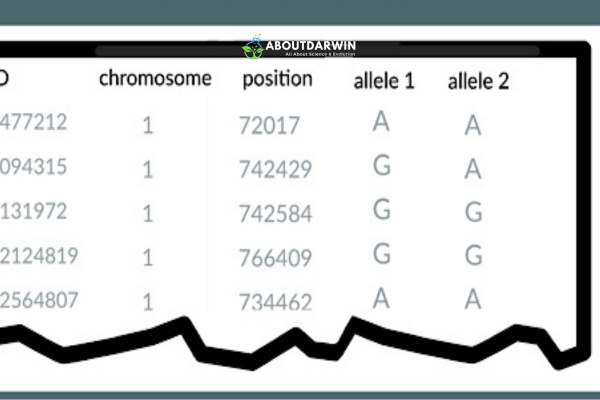
Raw DNA data is like a long list of letters that shows the makeup of your genes. When you take a DNA test, this data comes out as a text file full of rows and rows of these letters, each standing for parts of your DNA. The file contains approximately 700,000 genetic markers called SNPs (Single Nucleotide Polymorphisms) that represent specific positions on your chromosomes where genetic variation occurs.
Also Read: How To Find Your Birth Family with a DNA Test?
Downloading your AncestryDNA raw data is straightforward when you follow these steps carefully. The entire process typically takes under 10 minutes, though you may need to wait up to one hour for the confirmation email to arrive.
The process ensures the security and accuracy of your personal genetic information through password verification and email confirmation. Here are the exact steps:
By following these steps carefully, you can access and download a comprehensive file containing all your personal genetic markers tested through AncestryDNA. Keep this file secure and available whenever you need it for future analysis or uploads to other genetic genealogy platforms.
Understanding what you are downloading helps you manage your raw DNA file properly. When you complete the AncestryDNA download, you receive a ZIP archive that you must extract to access the contents.
Inside the ZIP file, you will find a text file (TXT) containing your genetic data. This file uses a specific format with columns showing the RSID (reference SNP cluster ID), chromosome number, position on the chromosome, and your genotype (the two letters representing your genetic code at that position). The file contains approximately 700,000 lines of genetic marker data.
Security is critical with this sensitive information. Store your downloaded file in an encrypted folder or password-protected location. Never email your raw DNA data unless using encrypted email services. If you manage multiple family members’ DNA tests, rename each file immediately after downloading since AncestryDNA uses generic filenames like ‘dna-data-2025-01-15.zip’ for all downloads. Adding the test-taker’s name prevents confusion and accidental mix-ups.
For more information about DNA privacy concerns, read our guide on whether DNA tests put your personal information at risk.
Once you have your AncestryDNA raw data downloaded, several powerful platforms accept uploads to expand your genetic genealogy research. Each service offers unique tools and databases that complement what AncestryDNA provides.
GEDmatch is the most popular third-party tool for genetic genealogists. This free platform accepts AncestryDNA uploads and provides advanced analysis tools including chromosome browsers, triangulation features, and one-to-many matching. GEDmatch helps you find cousin matches who tested with other companies and provides detailed segment data for confirming family relationships.
Family Tree DNA (FTDNA) accepts AncestryDNA transfers for a small fee. This service provides additional Y-DNA and mtDNA testing options along with their autosomal database. Many serious genealogists use FTDNA for its project features that help organize matches by surname or geographic origin. The transfer gives you access to their matching database without retesting.
MyHeritage DNA allows free uploads of AncestryDNA raw data and provides ethnicity estimates using their different reference populations. Many users find MyHeritage identifies Jewish, Scandinavian, and Eastern European ancestry with different precision than AncestryDNA. Their matching database continues growing rapidly and often produces matches not found elsewhere.
Living DNA specializes in detailed British and Irish ancestry breakdowns. Uploading your AncestryDNA data here can provide more granular regional results for UK ancestry. They also offer motherline and fatherline haplogroup information without additional testing.
For health insights, Promethease and Sequencing.com analyze your raw data against scientific literature to generate reports about genetic health risks, medication responses, and physical traits. These services typically cost between $10-50 and provide information not included in ancestry-focused reports.
Even with clear instructions, users sometimes encounter problems when attempting to download DNA data from AncestryDNA. Here are solutions to the most frequent issues based on community feedback and support forums.
Email confirmation delays: The confirmation email from AncestryDNA typically arrives within minutes but can take up to one hour. Check your spam or junk folder if you do not see it. If the email has not arrived after 60 minutes, request another download through your DNA settings page. Ensure your registered email address is current and accessible.
Expired download links: The confirmation link in your email expires after 7 days for security reasons. If your link expired, simply start the download process again from your DNA settings. AncestryDNA generates a fresh confirmation email with a new valid link each time you request a download.
Password verification failures: You must enter your current AncestryDNA account password to authorize the download. If you have forgotten your password, use the password reset feature before attempting to download. The password field is case-sensitive, so check your caps lock key.
Multiple DNA tests: If you manage several family members’ tests under one account, ensure you select the correct test from the DNA settings dropdown menu before downloading. Each test has a separate download process and generates distinct files. Label files immediately after downloading to avoid confusion between family members’ genetic data.
Yes, AncestryDNA allows you to download your raw DNA data after your test results are complete. The download is free and available through your DNA settings page. You will need to verify your identity with your password and confirm via email before accessing the file.
Yes, you can download a GEDCOM file containing your family tree data separately from your DNA raw data. Go to your family tree, click the tree name, and select ‘Export Tree’ to download the GEDCOM format. This is different from your DNA raw data file.
To download raw DNA from MyHeritage, log into your account, go to your DNA tab, click on ‘Manage DNA Kits,’ and select the download option. Like AncestryDNA, MyHeritage requires email confirmation and password verification before you can access your raw data file.
You can upload your AncestryDNA raw data to third-party sites like GEDmatch, Family Tree DNA, Living DNA, and MyHeritage for additional cousin matches and analysis tools. You can also use health analysis services like Promethease to learn about genetic traits and health markers.
To extract raw data from AncestryDNA, sign in to your account, navigate to DNA Settings, click ‘Download DNA data,’ verify your password, and confirm via the email link you receive. The file downloads as a ZIP archive containing a TXT file with your genetic information.
Raw DNA data contains approximately 700,000 genetic markers showing variations at specific chromosome positions. While the raw file itself is technical data, third-party tools can analyze it to reveal ancestry breakdowns, health insights, genetic traits, and cousin matching information beyond what AncestryDNA’s standard reports show.
Downloading your DNA from Ancestry creates a local copy of your genetic data on your computer. This does not affect your AncestryDNA account, matches, or ethnicity results. You maintain full ownership of the downloaded file and can upload it to other genealogy platforms for expanded research.
AncestryDNA implements multiple security measures including password protection, email confirmation for downloads, and encrypted data storage. However, as with any genetic testing service, review their current privacy policy and understand that data breaches, while rare, are possible. Downloading and securing your own copy gives you additional control over your genetic information.
Also Read: Ancestry DNA Review – Exploring Your Genetic Heritage | 23andMe vs AncestryDNA Comparison
Downloading your raw data from AncestryDNA is a straightforward process that takes just minutes but opens up a world of possibilities for your genetic genealogy research. By following the steps in this guide, you can secure your genetic information and expand your research across multiple platforms.
Remember to rename your downloaded file immediately, store it securely, and consider uploading to third-party genetic genealogy websites like GEDmatch and Family Tree DNA to maximize your DNA testing investment. Your raw data holds insights waiting to be discovered—take control of your genetic information today and unlock the full potential of your ancestry research in 2026.


