Physical Address
304 North Cardinal St.
Dorchester Center, MA 02124
Physical Address
304 North Cardinal St.
Dorchester Center, MA 02124

Create your family tree with MyHeritage Family Tree Guide and uncover hidden stories and features that will transform your genealogical journey.
Tracing your roots has never been more accessible. The MyHeritage Family Tree Guide provides a clear path for anyone ready to map their ancestry, whether you’re starting from scratch or importing years of research. With billions of historical records and AI-powered discovery tools, this platform transforms scattered family stories into an organized, visual history.
What makes this guide essential in 2026? MyHeritage continues to roll out features that simplify genealogy work. From the March 2026 release of Country Coding flags to the Scribe AI tool that reads handwritten documents, the platform keeps evolving. You’ll learn how to leverage the “Magic 7” technique to trigger automatic matches, navigate the four distinct tree views, and decide which subscription tier fits your research goals.
If you’re new to the platform, start with our overview of the MyHeritage platform for a complete look at its capabilities. Then return here to build your tree step by step.
The fastest way to see results on MyHeritage follows a simple formula known as the “Magic 7.” This starting structure triggers the platform’s Smart Matching algorithm to begin finding connections immediately.
These seven people create the foundation that powers MyHeritage’s matching technology. Once entered, the system begins scanning billions of records and millions of other family trees to find potential matches. Many users report receiving their first Smart Matches within minutes of completing this basic structure.
For those completely new to genealogy, understanding what is a family tree and how it documents relationships will help you organize information more effectively before you begin.
MyHeritage offers multiple pathways to build your family tree. You can start fresh on the website, use the downloadable Family Tree Builder software for offline work, or import an existing tree via GEDCOM file. Each method connects to the same research databases and matching algorithms, so your choice depends on workflow preference.
Building your tree on MyHeritage begins with a straightforward interface designed for beginners and experienced researchers alike. The platform guides you through entering your first few relatives, then expands as you add more branches. Unlike generic genealogy advice, MyHeritage provides specific tools that accelerate the process.
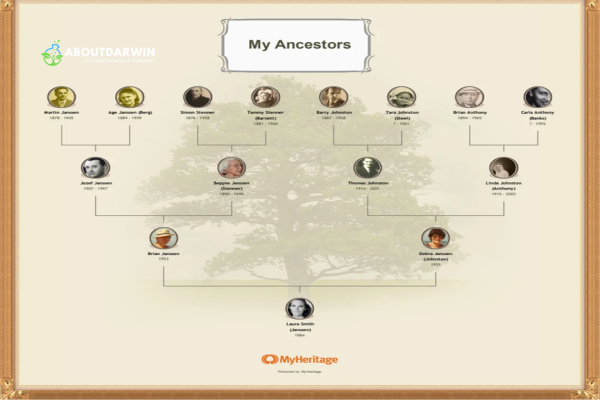
Start by entering what you know. Names, approximate dates, and locations all help. Even incomplete information triggers matching algorithms. MyHeritage’s search technology uses phonetic matching and name variants to find records that might not match exactly but likely refer to the same person.
Four distinct tree views serve different research purposes:
Each view synchronizes automatically. Switch between them without losing your place. The platform also offers a Family Tree Timeline that plots events chronologically, helping you spot inconsistencies or understand what ancestors experienced during specific historical periods.
For visual researchers, the Fan view particularly excels at revealing migration patterns. When you notice ancestors clustering in specific regions during particular decades, you can focus record searches on those geographic areas during those timeframes.
Color coding, introduced in recent updates, lets you mark branches by surname, geographic origin, or research status. This visual organization helps manage large trees with thousands of entries, making it easier to track which lines need attention.
Effective tree management requires knowing when to use each view format. Family view serves daily research and adding new relatives. Pedigree view excels at ancestor-focused work. Fan view helps present findings to relatives at gatherings. List view becomes essential for data cleanup on mature trees.
Keyboard shortcuts speed navigation. Arrow keys move between individuals. Plus and minus keys zoom in and out of complex trees. These small efficiencies add up when you’re working through hundreds of potential matches or organizing a tree with thousands of entries.
MyHeritage distinguishes itself through automated research assistance. Two core technologies, Smart Matches and Record Matches, continuously scan for connections while you focus on other tasks. Understanding how these tools function separates casual users from effective researchers.
Smart Matches compare your tree against all other MyHeritage family trees. When the algorithm finds someone in another user’s tree who matches your ancestor, it flags the potential connection. These matches help you discover cousins, verify dates, and find photographs or stories shared by distant relatives.
To confirm a Smart Match, review the comparison side-by-side. Check that names, dates, and family relationships align. Reject matches that don’t fit your known facts. Confirming accurate matches strengthens your tree and notifies the other user of the connection.
Record Matches scan MyHeritage’s historical record collections for documents mentioning your ancestors. These include census records, birth certificates, marriage licenses, military files, immigration papers, and newspaper archives. Each match presents the original document with your ancestor’s information highlighted.
Confirming Record Matches adds evidence to your tree. The source citation attaches automatically, maintaining research standards. Rejecting incorrect matches improves the algorithm’s accuracy for future suggestions.
Instant Discoveries offer another automation layer. This feature can add entire branches to your tree with a single click when it finds high-confidence matches in other trees. Use this cautiously on well-documented lines, but it can rapidly expand known connections.
PedigreeMap provides geographic visualization of your ancestry. This interactive tool plots birth, marriage, and death locations on a world map. Zoom in to see street-level detail of ancestral villages. Filter by time period to watch migration patterns emerge. Researchers use this to identify record jurisdictions and understand the distances ancestors traveled.
Effective strategies for managing matches include:
Organized data produces better research results. MyHeritage provides several tools for maintaining tree quality as it grows from a few relatives to thousands of connected individuals.
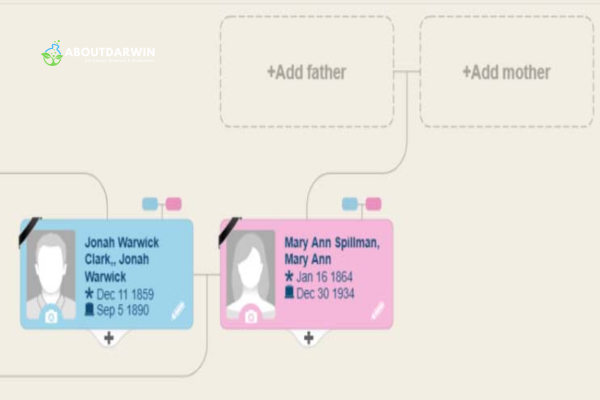
Data organization starts with consistent entry practices. Use full names rather than nicknames in primary fields. Enter locations in standardized formats. These habits make search and matching functions more effective.
Privacy settings control who sees your information. MyHeritage offers granular permissions:
Collaboration features include inviting family members as guests, contributors, or managers. Each role carries different permissions. Guests can view. Contributors can add information. Managers can edit and modify tree structure. Setting appropriate roles prevents accidental changes while encouraging family participation.
Mobile access extends your research capabilities. The MyHeritage app for iOS and Android lets you review matches, add photos, and update information while visiting relatives or researching at libraries. Changes sync automatically to your main tree.
Effective tree management goes hand-in-hand with organizing your genealogy research strategies that keep your files structured and accessible.
Family collaboration multiplies your research power. Different relatives hold different pieces of the story. MyHeritage’s site system creates a central location where distributed family members can contribute what they know.
Setting up a family site starts with selecting a privacy level. Premium Family sites offer additional features like custom backgrounds and expanded storage. Invite relatives by email with personalized messages explaining what you’re hoping to achieve together.
Best practices for collaborative trees include:
Historical records form the backbone of verified genealogy. MyHeritage provides access to billions of documents spanning centuries and continents. Effective searching requires strategy rather than random browsing.
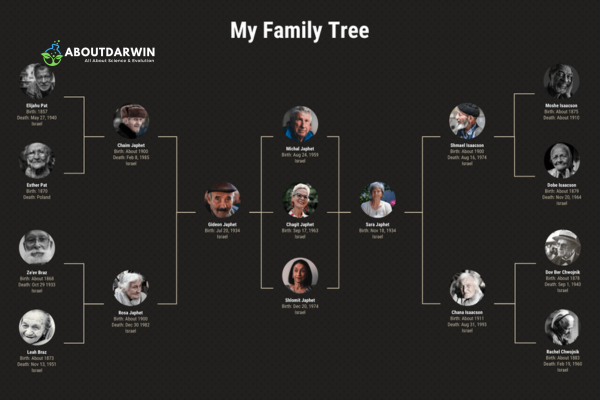
SuperSearch provides the main interface for exploring records. Start with specific information: full name, approximate dates, and locations. Use filters to narrow results by record type, date range, and geographic area. Save successful searches to repeat as new records are added to the database.
Search strategies that yield better results:
Record Detective extends your finds by analyzing discovered documents and suggesting related records. This tool often identifies parents, siblings, or children mentioned in the same documents as your target ancestor.
Cousin Finder locates living relatives based on shared ancestors in your tree. This feature helps connect with distant cousins who may hold family photographs, documents, or stories not available elsewhere.
DNA integration adds another research dimension. When you combine family tree data with DNA test results, MyHeritage identifies which branches connect to specific genetic matches. Learn more about the MyHeritage DNA testing timeline and what to expect from the process when you’re ready to add genetic evidence to your research.
When you’re ready to enhance your tree with DNA data, you can also explore using DNA tests for family tree building and how genetic evidence complements traditional document research.
These two technologies separate MyHeritage from basic tree-building software. Understanding their differences helps you use each effectively.
Smart Matches connect you to other researchers. They find people in other MyHeritage trees who appear to be the same as your ancestors. The algorithm considers names, dates, locations, and family relationships. Confidence scores indicate match strength.
Record Matches connect you to historical documents. They find census records, birth certificates, military files, and other sources mentioning your ancestors. These matches provide evidence for facts in your tree and often reveal new information.
Both match types require your evaluation. The algorithms suggest; you decide. Confirming matches adds information to your tree and improves accuracy. Rejecting incorrect matches trains the system and prevents misinformation spread.
Match management strategies for large trees:
MyHeritage offers specialized photo tools that go far beyond basic editing. These AI-powered features help restore damaged photographs, add color to black-and-white images, and even animate still photos for emotional engagement.
Colorize automatically adds realistic color to monochrome photos. The AI analyzes the image and applies period-appropriate colors based on clothing styles, environmental context, and historical research. Results often surprise relatives who have only seen ancestors in black and white.
Enhance sharpens blurry or low-resolution photos. Old scans, distant relatives in group shots, and damaged prints become clearer. This tool rescues photos previously considered unusable for identification.
Deep Nostalgia animates faces in still photographs. The AI applies realistic motion to create short videos of ancestors blinking, smiling, and turning their heads. While not a research tool, this feature deeply engages family members with their heritage.
Photo Tagger uses facial recognition to identify people across your photo collection. Once you tag someone in a few photos, the system suggests tags in other images. This organizes large collections and connects faces to names in your tree.
Reimagine is a mobile app for scanning and improving photos using your smartphone. Point your camera at old prints or negatives, and the app captures, enhances, and uploads them to your MyHeritage account. The app includes scratch removal, color correction, and sharpening tools specifically designed for genealogical photos.
Scribe AI, released in early 2026, reads and transcribes handwritten documents. Upload letters, diaries, or old certificates written in cursive or historical scripts. The AI extracts text you can search, copy, and attach to tree entries. This tool transforms previously inaccessible documents into searchable sources.
These tools preserve history in ways that standard photo editing software cannot match. By combining restoration with genealogical organization, MyHeritage keeps visual family history connected to the people and stories in your tree.
GEDCOM (Genealogical Data Communication) files provide universal transfer between genealogy programs. MyHeritage supports both import and export, ensuring your research remains portable.
Importing a GEDCOM file brings existing research into MyHeritage. The system preserves names, dates, locations, notes, and source citations. After import, Smart Matches begin scanning your transferred tree immediately.
To import:
Exporting creates a backup or prepares your data for transfer to another platform. MyHeritage automatically emails GEDCOM backups monthly to Premium subscribers, but manual export provides immediate protection.
To export:
Understanding what each subscription tier offers helps you choose appropriately for your research stage. MyHeritage operates on a freemium model with several paid upgrade options.
Free tier includes building a family tree up to 250 people, basic photo storage, and limited record access. You can receive Smart Matches and Record Matches, but viewing full details requires subscription. This tier works well for beginners testing the platform or those with small trees.
Premium subscription expands your tree to unlimited size and adds enhanced Smart Matching. You gain access to Instant Discoveries and priority customer support. This tier suits dedicated family historians focused on tree building.
Data subscription focuses on record access. You can view and save all historical records, use SuperSearch without limits, and access Record Detective. This tier fits researchers working extensively with census, military, and immigration records.
Complete subscription combines Premium and Data features with added photo tools. You receive full access to Colorize, Enhance, and unlimited photo storage. For a detailed comparison of MyHeritage and Ancestry to help you decide which platform suits your research needs, see our comprehensive platform analysis.
Omni subscription adds DNA features. You receive all Complete benefits plus DNA matching and ethnicity estimates without purchasing a separate DNA kit. This tier suits users who want genetic genealogy integrated with their subscription.
Subscription lengths range from monthly to annual with significant discounts for longer commitments. Many users report finding value in discounted 6-month subscriptions when available. The free tier allows meaningful exploration before any financial commitment.
Research happens everywhere, not just at desks. MyHeritage’s mobile apps extend your capabilities to phones and tablets.
The main MyHeritage app provides tree access, match review, and photo upload. View your family tree in all four formats optimized for smaller screens. Receive push notifications when new matches appear. Record audio interviews with older relatives directly into the app.
The Reimagine app specializes in photo capture and enhancement. Scan old photos using your phone camera with automatic cropping and perspective correction. Apply Colorize, Enhance, and animation features immediately. Share results to social media or your MyHeritage tree.
Mobile workflows that improve research:
MyHeritage Family Tree works by combining manual data entry with automated matching technology. You start by entering basic information about yourself and close relatives. The platform’s Smart Matching algorithm then compares your entries against billions of historical records and millions of other family trees. When matches are found, you receive notifications to review and confirm potential connections. Confirmed matches add new ancestors, documents, and photographs to your tree automatically.
Yes, MyHeritage offers a free tier that supports family trees up to 250 people. The free plan includes basic tree building, photo storage, and receiving Smart Match notifications. However, viewing full match details, accessing historical records, and using advanced photo tools require a paid subscription. The free tier works well for beginners exploring genealogy before committing financially.
MyHeritage and Ancestry each excel in different areas. MyHeritage offers superior international record collections, particularly for European genealogy, and unique photo tools like Colorize and Deep Nostalgia. Ancestry dominates in US records and has a larger DNA database. MyHeritage subscriptions typically cost less. For a detailed platform comparison, see our comprehensive analysis. Your choice depends on your geographic research focus and budget.
The Magic 7 refers to the seven foundational people that trigger MyHeritage’s Smart Matching algorithm: yourself, your two parents, and your four grandparents. Entering these seven individuals with basic details activates the automated matching system. Many users receive their first Smart Matches within minutes of completing this basic structure, making it the recommended starting point for new users.
Smart Matches compare your family tree entries against all other trees on MyHeritage using proprietary algorithms. The system evaluates names, dates, locations, and family relationships to identify potential matches. When found, these appear as notifications for your review. You can confirm accurate matches to add information to your tree or reject incorrect ones to improve future matching accuracy. The algorithm improves as more users confirm and reject matches.
Yes, MyHeritage supports exporting your family tree as a GEDCOM file, which is the universal format for genealogy data transfer. Navigate to Family Tree, then Manage Trees, and select Export GEDCOM. You can choose to include just tree data or also photos and documents. Premium subscribers receive automatic monthly GEDCOM backups via email. This ensures your research remains portable and protected.
MyHeritage offers several printing options through their charts service. You can generate professional-quality pedigree charts, fan charts, and family group sheets in various sizes from standard paper to large-format prints. Access the chart printing feature from your family tree page. Charts can be customized with photos, backgrounds, and color schemes. Physical charts make excellent gifts for family reunions and holidays.
This MyHeritage Family Tree Guide has covered the essential tools and techniques for building your ancestry online. From the Magic 7 starting method that triggers Smart Matches to the four tree views that present your findings differently, you now have a framework for effective research.
The platform’s strength lies in its combination of automation and control. Smart Matches and Record Matches continuously scan billions of records while you focus on evaluation and tree building. Photo tools like Colorize and Deep Nostalgia engage family members emotionally with their heritage. Mobile apps extend your research beyond the desktop.
Whether you choose the free tier to start or invest in a Complete subscription for full access, MyHeritage provides tools that scale with your commitment. The free 250-person tree accommodates most beginners, while subscription options unlock records and features for serious researchers.
Start with the Magic 7. Explore the tree views. Review your matches regularly. And remember that genealogy is collaborative, family history is ongoing, and every confirmed match adds another piece to your story.
MyHeritage offers powerful tools, but you may also want to explore free genealogy resources to complement your research. Additionally, if you want to deepen your knowledge further, consider exploring genealogy books for further learning.


